Print manifests
A manifest is a packing list for a case: what is inside it, how much it all weighs, and whether what is packed matches what should be there.
Print one case
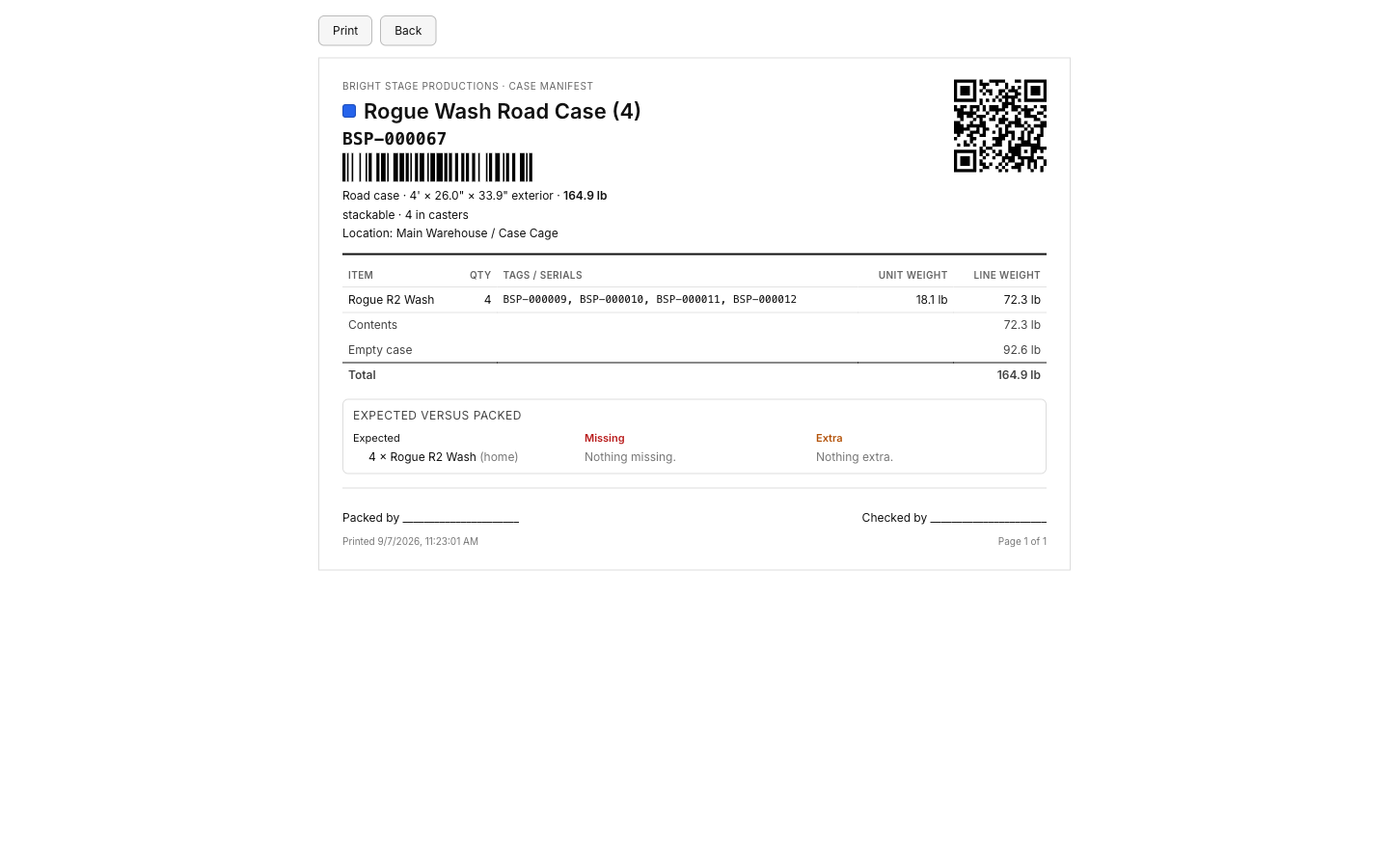
From a case unit's page, or right after packing it in Scan gear in and out, choose Print manifest. It opens a print-styled page with:
- The case's name, asset tag with its QR code and barcode, type, exterior dimensions, and total weight.
- Handling flags: stackable, rider, no flip, and caster size.
- The job it is out on and its dates, or its home location if it is not out.
- A contents table: item, quantity, asset tags or serial numbers, and unit and line weight, with any nested case indented under its own contents.
- Sign-off lines for packed by and checked by.
If any packed item has no weight on file, the total is marked weight incomplete so you know the number is a floor, not the real total.
Print every case on a job
From a job's page, choose Print manifests to get one document with one page per case, sorted by tag, everything that is out on that job in one stack of paper.
Dedicated cases show expected versus packed
For a dedicated case, the manifest adds an expected-versus-packed block: what should be inside (its home items and residents), what is actually scanned in, and anything missing or extra called out separately.
Manifests print through your browser's print dialog rather than building a PDF file. Choose "Save as PDF" in that dialog if you want a file instead of paper.