Create an invoice or estimate
Invoices and estimates use the same builder in ShowBill. An estimate is a proposal you send before the work is booked. An invoice is the bill you send to get paid. Both live in their own list (Invoices and Estimates) and share the same look on the page and on the PDF.
Start a new document
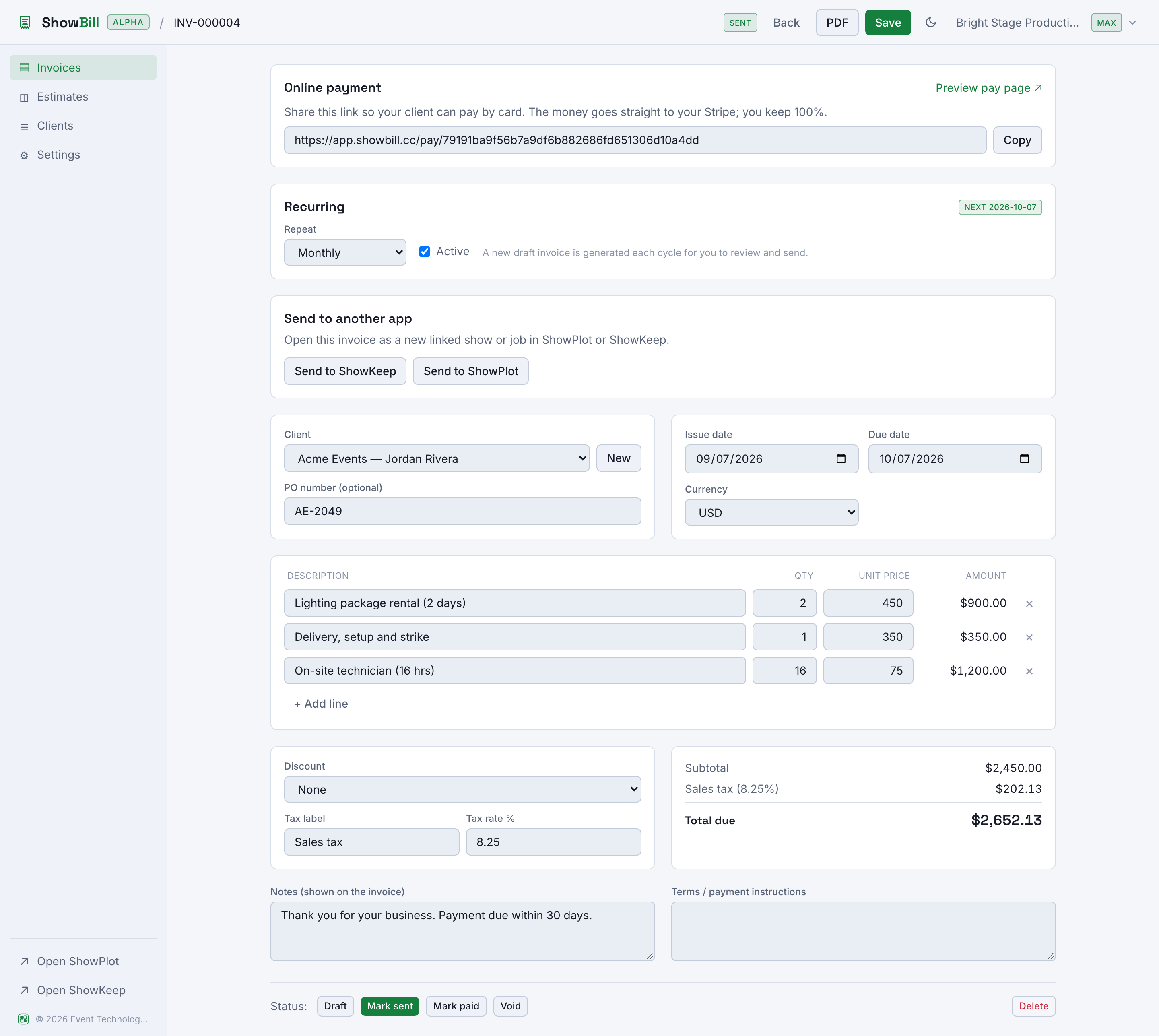
From Invoices or Estimates, select New invoice or New estimate. You get a blank document with today filled in as the issue date, and, for invoices, a due date calculated from your default payment terms in Settings.
Fill in the client and dates
Pick a client from the dropdown, or add one on the spot with the New button next to it. Set the issue date, and for invoices, the due date. A PO number field is there if your client needs one.
Add line items
Each line is a description, a quantity, and a unit price. ShowBill multiplies them into a line amount as you type, for example "Lighting rental, 2 day" at 1 x $500.00. Add as many lines as the job needs with + Add line, and remove any with the × next to it.
Discounts and tax
Apply a discount as a percent or a fixed amount, and set a tax label and rate (it defaults to "Sales tax" but you can rename it). ShowBill totals the subtotal, discount, and tax into the amount due as you edit.
Notes and terms
Two free-text fields sit below the totals: Notes, shown on the document, and Terms, for payment instructions. Both start filled in with your defaults from Settings, and you can edit them per document.
Save, send, and track status
Save the document, then move it through its lifecycle with the status buttons: Mark sent, Mark paid, or Void. An invoice that is sent and past its due date shows as Overdue automatically, no action needed.
Download the PDF
The PDF button opens a branded document with your business letterhead, the client's billing details, the line items, and the total, ready to download or attach to an email.
From estimate to invoice
An estimate and an invoice are separate documents with their own numbering. Send the estimate as your proposal. Once the client agrees, create the invoice and carry the agreed lines across yourself; the estimate stays in your Estimates list as your record of what was proposed.
Every document defaults to your organization's currency from Settings. Billing a client in a different currency needs Pro.